Most “B2B portal” conversations start with a feature wishlist. Quotes, negotiated pricing, approval workflows, company accounts – all real, all useful, all covered reasonably well by Adobe Commerce B2B or a layer built on top of it. But there are three things that come up constantly once a B2B store actually has real buyers on it, and they almost never make it onto the initial wishlist.
Not because they’re hard to build. Because they don’t demo well, they don’t show up in a sales pitch, and nobody notices they’re missing until a real buyer gets stuck mid-order.
A B2B buyer who orders the same 40 items every month doesn’t want to browse a catalog. They want to paste a list of SKUs and quantities and check out. That’s it.
Without that, the alternative is what actually happens on most B2B stores today: the buyer opens a spreadsheet from last month’s order, searches for each SKU one by one, adds it to cart, and repeats forty times – or gives up and emails a purchase order to someone on the sales team instead. Every one of those emails is an order the store didn’t capture, and a task that landed on a human who now has to type it into the system by hand.
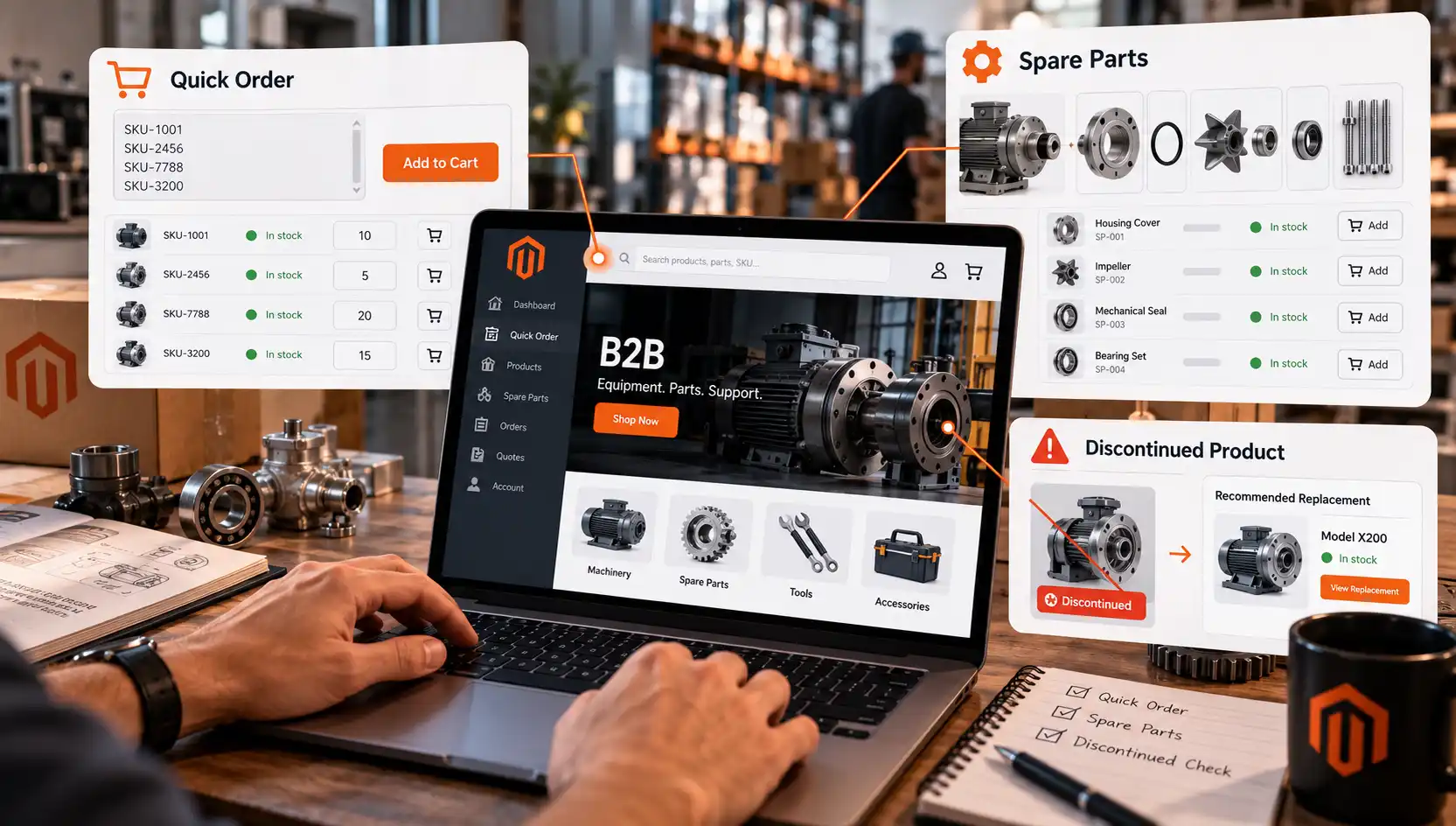
We built this as QuickOrder, a free Magento 2 module: paste a SKU list, or upload one, get instant validation against stock and pricing, and add everything to cart in one step. It sounds almost too simple to be worth a dedicated feature. In practice it’s usually the single highest-leverage thing you can add to a B2B catalog, because it removes the exact friction that pushes repeat buyers back to email and phone orders.
Equipment and parts sellers get one question on repeat: “which part fits this model?” If the answer only lives in a PDF a sales rep has to look up, every one of those questions becomes a support ticket instead of a sale.
The pattern we keep seeing: a machine, appliance, or vehicle product page with no structured link to the parts that fit it. The buyer either already knows the exact part number (rare), or has to contact support and wait. Multiply that by a catalog with thousands of parent products and tens of thousands of compatible parts, and you’ve built a support queue instead of a self-service channel.
Structured compatibility data changes the economics of that interaction. A parts lookup that’s actually on the product page, with its own storefront presence, turns a support ticket into a two-click purchase – and it’s the kind of feature that pays for itself in support hours saved alone, before counting the orders it captures that would otherwise have gone to a competitor who made the lookup easier.
Nothing erodes trust in a B2B relationship faster than a confirmed order that comes back two days later as “sorry, that’s no longer available.” The buyer planned around it. Maybe it was part of a larger order, a scheduled maintenance run, or a build that now can’t ship on time.
If the system doesn’t know a product is dead at the moment of ordering, the buyer finds out the expensive way – after the fact, from a human, instead of before, from the storefront. The fix isn’t complicated: block the sale at the source, and show the replacement right there instead of a dead end. A buyer who gets redirected to the current equivalent in the same two minutes they were already spending on the order rarely minds. A buyer who finds out by phone two days later remembers it for a long time.
None of these three problems is complicated engineering on its own. What makes them worth building together is that they overlap in the same order flow. A discontinued item sitting in a QuickOrder SKU list shouldn’t just fail silently – it should surface its replacement inline, in the same paste-and-go flow the buyer was already using. A spare part that gets discontinued needs the same replacement logic as a discontinued parent product. Build these as three disconnected extensions and you get three places where the same buyer hits a different dead end. Build them so they talk to each other, and a self-service order either goes through cleanly or tells the buyer exactly what to do next – without a support ticket in between.
We’ll go deeper on the Spare Parts and Discontinued Products modules specifically in upcoming posts – what the compatibility data model looks like, how the storefront presentation works, and where each one tends to get scoped wrong. For now, if reordering by SKU is the gap costing you the most support time, QuickOrder is live and free to use today.
None of this requires rebuilding your B2B setup from scratch. It requires noticing which of these three gaps your buyers are already routing around – by email, by phone, or by going somewhere else.